Published on: 2019-03-18
Building a QEMU Template Constructor
Estimated time to read: 2 minutes
The Nutanix AHV VM format is based on QEMU. In order to build VMs for the AHV platform, you need to provision a VM with the appropriate settings.
- Due to a bug in Red Hat, the two SCSI controller options (scsi and virtio-scsi) can't be used. Unfortunately, the default controller in Nutanix is the virtio-scsi controller.
- The stable release of Debian doesn't have a recent enough version of QEMU associated with it, so the unstable release was used
Setup
- Create a Virtual Machine in VirtualBox and ensure that the settings for Nested Virtualisation are enabled
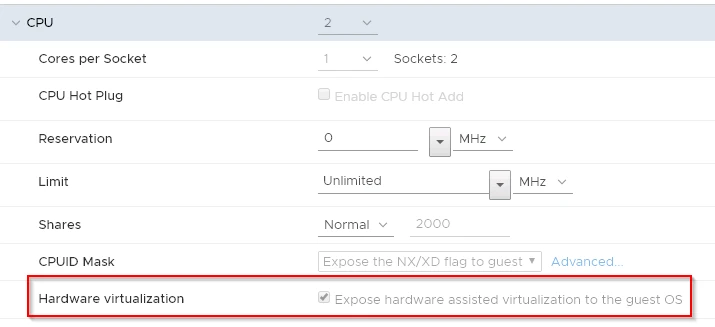
- Provision the virtual machine
- Confirm that virtualisation features are exposed in the VM
- Install the core QEMU tools
- At this point, you should be able to create VMs
- Install packer
- If you intend to build VMs with headerless mode set to false, then you will need to install a GUI. To the right is the commands to install the GNOME desktop interface
Building a Template
- Transfer installation media to the QEMU server
- Stage files for creating the template via packer on the QEMU server
- Run packer pointing to the json file
-
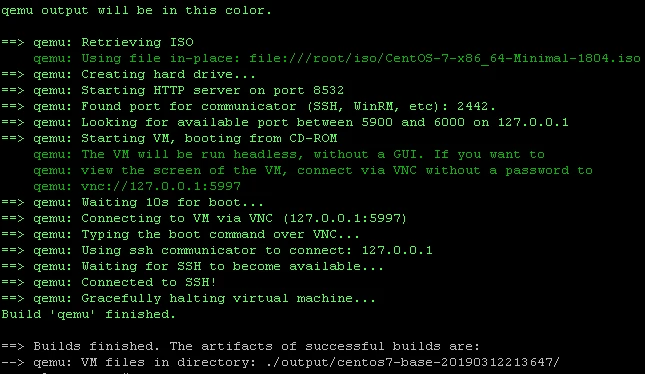
If successful, output similar to this will happen